
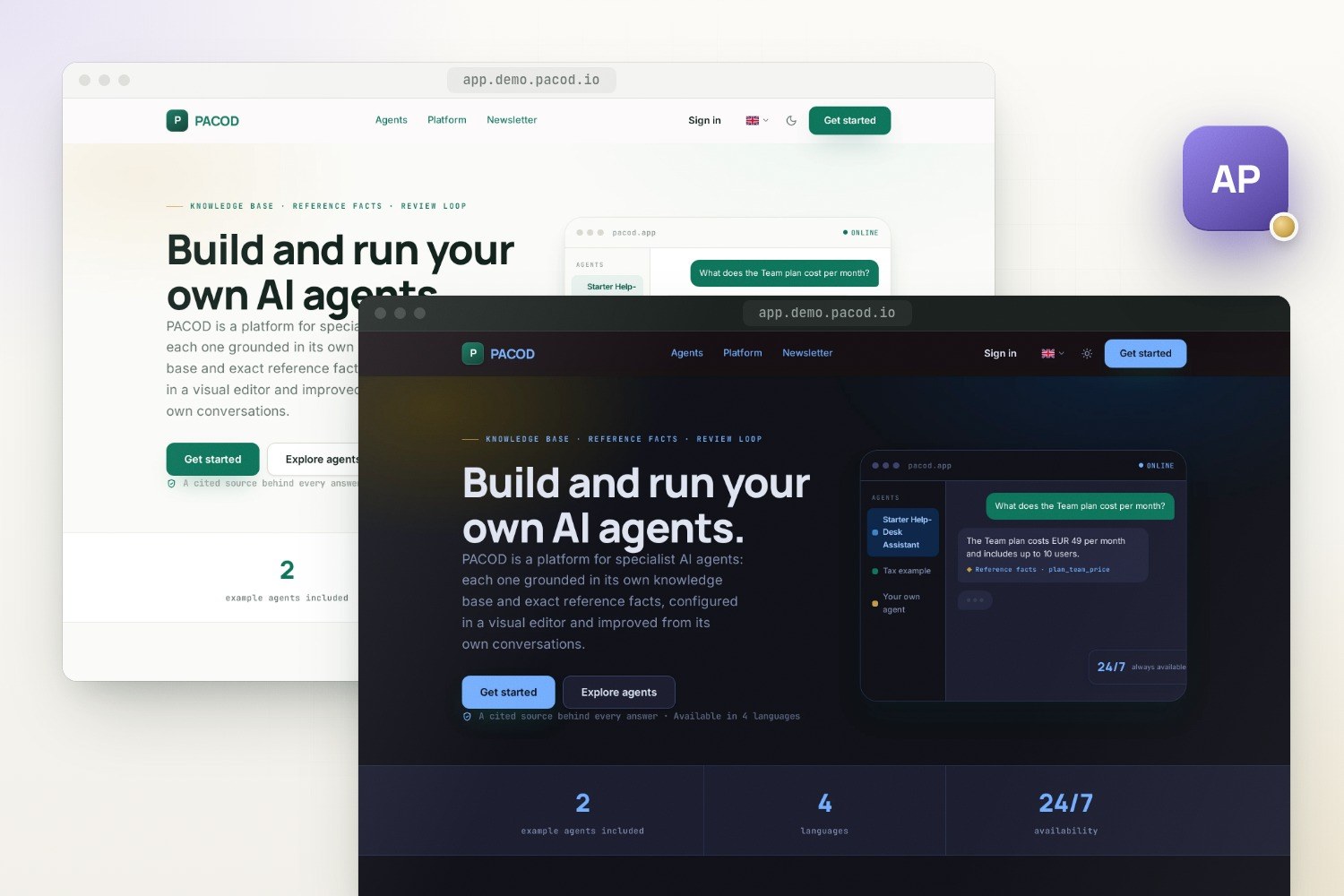
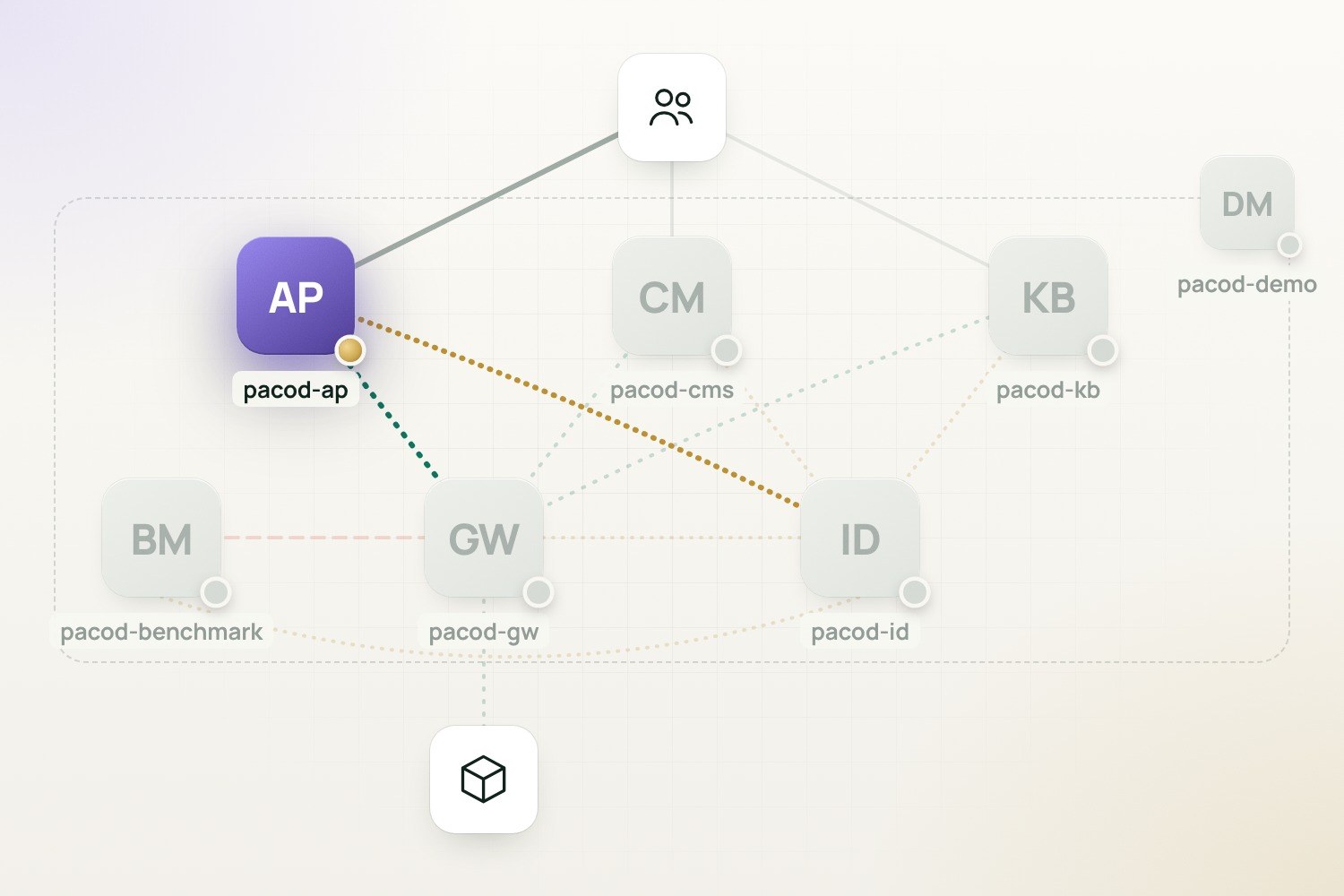
pacod-ap hosts any number of self-contained AI agents on one deployment. Each agent answers from its own knowledge base and exact reference facts, cites its sources and is reviewed from its own conversations; all of them share one sign-in through pacod-id, one admin console and one LLM gateway, pacod-gw.
Agent-building platform
- Licence: Apache-2.0
- Version: 0.1.0 · Preview
- Written in: Python, TypeScript
- Tech stack: FastAPI, LangGraph, MCP, SvelteKit, PostgreSQL, Redis, Qdrant, Caddy, Grafana
- View on GitHub · Open an issue
Features
Agents as profiles
Each agent has its own knowledge base, reference facts, prompts, directives, settings, conversations and reviews, and the isolation between agents is enforced in code.
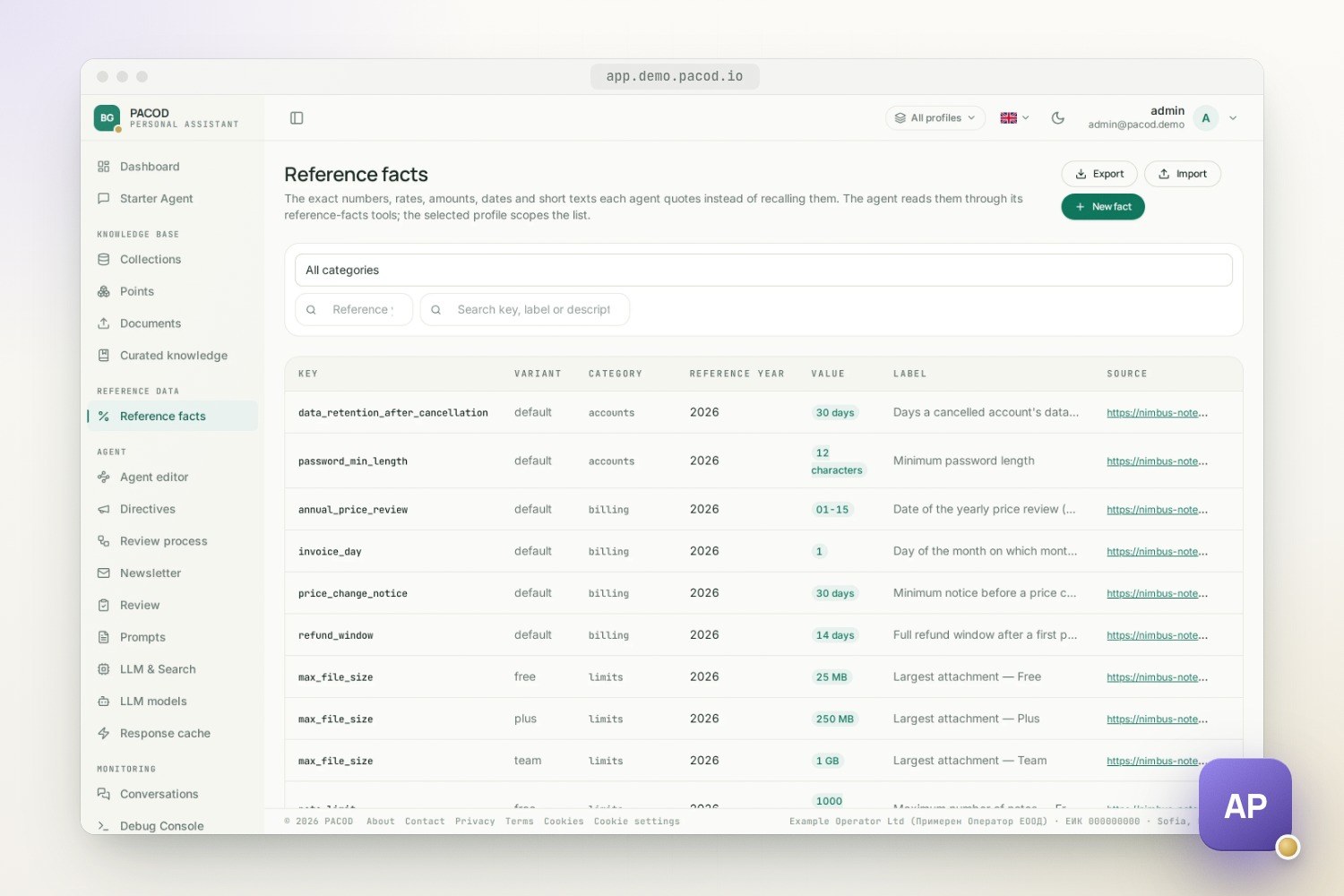
Reference facts
Prices, rates, limits and dates are typed rows in PostgreSQL, read over MCP with the agent and the year set by code, so the model quotes them instead of recalling them.
Knowledge per agent
Two-stage retrieval over the agent's own Qdrant collections (bge-m3 search, a cross-encoder rerank, parent passages) plus a curated tier that admins approve.
Visual agent editor
Switch and configure an agent's components on a canvas, try the draft as a dev deployment and publish it; every version is kept, and a rollback moves a pointer.
Guarded streaming chat
Language, quota and topic guards answer before the stream opens; the answer streams with its citations, and the same agents are served over an OpenAI-compatible API.
Review loop
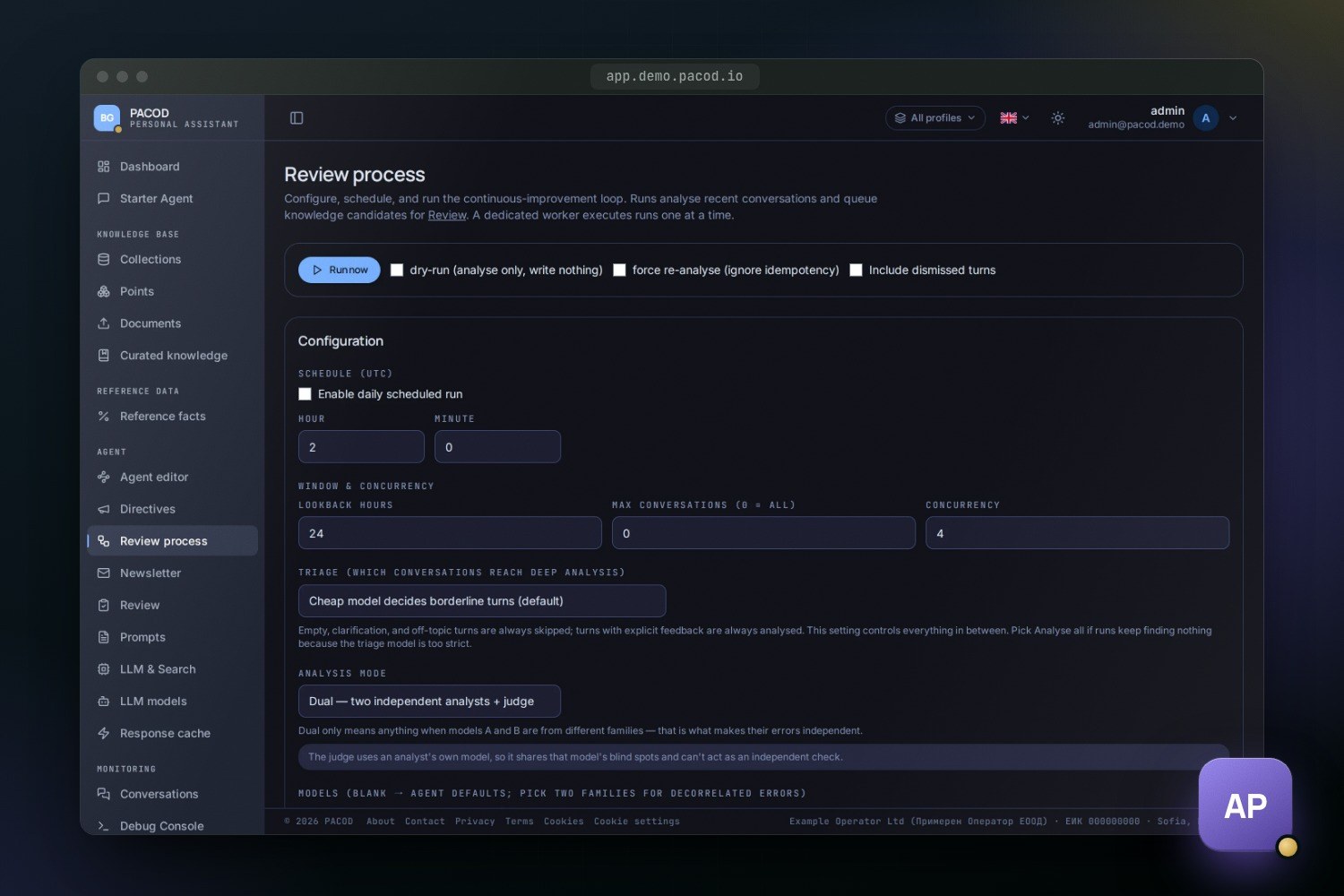
A worker analyses each agent's conversations against what it actually read, writes the fix, groups recurring problems and leaves every change to a human.
One admin console
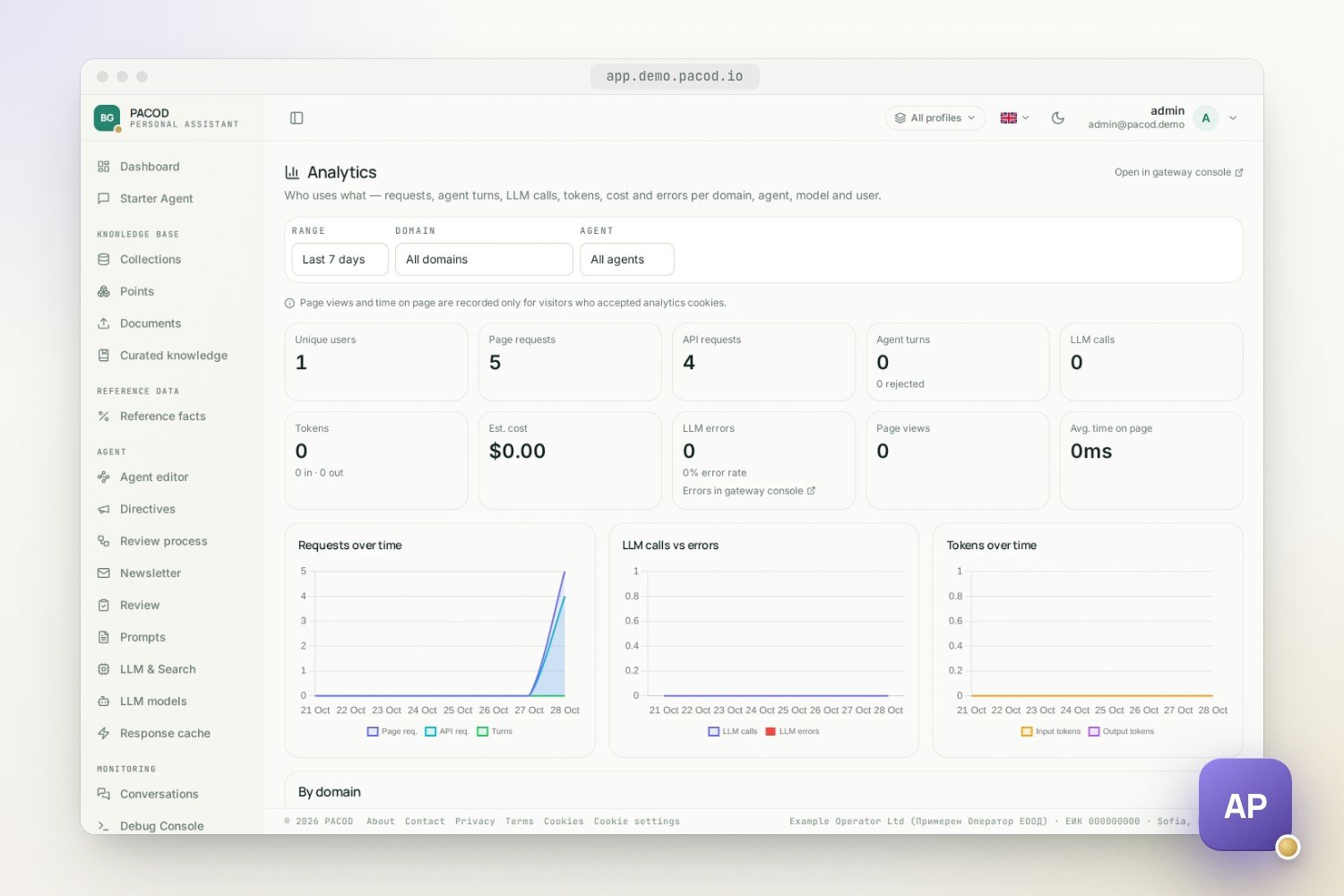
Agents, users, knowledge, facts, directives, prompts, models, caches, conversations, a per-step debug console, analytics and a newsletter, for all agents or for one.
Multilingual
Agents answer in Bulgarian and English, chosen per deployment and per agent; the interface is in English, Bulgarian, German and Russian.
Screenshots
Why it exists
pacod-ap is built for agents whose job is to give correct, sourced answers in one domain, where a wrong price, rate or due date is worse than no answer. Three rules shape it:
- Every number comes from a structured source of truth, never from the model's memory.
- Every claim cites a source: a knowledge-base passage, a fact's
source_url, or an allow-listed web page. - Admins correct an agent without a redeploy. Models, prompts, directives, web search and caching apply on the next turn.
It began as a Bulgarian tax assistant and keeps that assistant's structure. The tax assistant now ships as an advanced example, and the default agent is a generic one, meant to be copied.
One deployment, many agents
An agent is a profile: one row in the profiles table plus everything scoped to it. Two ship
with the platform:
- starter, the default: the help desk of a fictional note-taking service, "Nimbus Notes", with 29 reference facts, a small corpus in Bulgarian and English, and a golden set of test questions. It gives every feature something to show.
- taxes, an advanced example for Bulgarian tax and accounting, with its own prompts, facts, law
corpus and web-search allow-list (
make seed-example PROFILE=taxes). The corpus is there to show retrieval on a real body of law. It is not kept up to date, and nothing the agent says is legal or tax advice.
Isolation between agents is a security boundary: every per-agent row carries a profile_id, each
agent has its own Qdrant collections, and a turn for one agent can reach only that agent's data.
| Per agent | Shared by the deployment |
|---|---|
| Reference facts, directives, prompts, ingested sources | Accounts and roles (pacod-id) |
| Model per role; web-search, cache, review and newsletter settings | LLM templates and web-search keys |
| Conversations, audit rows, retrieval traces, debug steps | The embeddings service: one 1024-dimension space |
| Review findings, recurring problems, golden tests, editor versions | Providers, models, prices and token limits (pacod-gw) |
People see only the agents assigned to them, and a new person gets every released agent on their
first request. Admins work across all agents or scoped to one, chosen at the top of the console.
Quotas count per person across all agents. An agent is in one of three states, prod, dev or
archived, and only a prod agent is visible to someone who is not an admin.
The pieces
| Container | Role |
|---|---|
pacod-caddy |
The only public edge: TLS and a reverse proxy, with sites for the app, pacod-id and the gateway console |
ap-frontend |
SvelteKit backend-for-frontend: the public website, the chat and the admin console; sign-in tokens stay on the server |
ap-api |
The chat API and the LangGraph agent, plus an OpenAI-compatible /v1 |
ap-admin-api |
The control plane: agents, assignments, per-agent configuration, and facades over pacod-id and the gateway |
ap-ingestion or ap-ingestion-cpu |
Chunks, embeds and stores documents in one agent's collections |
ap-mcp |
The reference-fact tools get_fact and list_facts |
pacod-embeddings |
bge-m3 embeddings and a bge-reranker cross-encoder, shared by all agents |
ap-improvement-loop-worker, ap-newsletter-worker |
Always-on workers that drain queue tables in PostgreSQL, one job at a time |
ap-redis, ap-pgbouncer |
Caches, quotas and the frontend's sessions; the connection pool in front of PostgreSQL |
pacod-postgres, pacod-qdrant, pacod-id |
Shared components: PostgreSQL 18.6, the vector store and the identity provider |
Every container has one name on the shared Docker network pacod-net: ap-* for pacod-ap's own
services, pacod-* for the components it shares with the other pacod projects. The listeners that
only servers may reach, the gateway's management API and pacod-id's internal listener, sit on a
second network, pacod-admin-net. It is internal, with no route out, and only their callers join it.
How a chat turn flows
The guards run before anything streams, so a rejection is a proper HTTP status, not an error in the middle of a stream:
- Auth. The pacod-id token is verified. An ended session or a disabled account is refused (401); if pacod-id's signing keys cannot be read, the answer is 503.
- Agent. The requested agent must be assigned to the person and released (403 otherwise). A person who names none gets their only assignment, never a guess.
- Language. Detected per turn and checked against the agent's languages (400).
- Quota. The gateway's daily token limit per person, 100,000 tokens by default, plus a per-minute throttle and an optional request quota in Redis (429). If the gateway does not answer, the token check lets the turn through and logs it.
- Topic. A fixed filter of illegal phrases (403), then a cheap classifier: an off-topic question is turned away (400), and an unclear one gets clarifying questions back.
Then the server-sent-event stream opens. A first question may be answered from the agent's semantic answer cache. Otherwise a small LangGraph graph runs:
- plan: the planner returns JSON, naming the tools to call and whether the question is complex.
- execute tools: all planned calls run concurrently:
kb_search,get_factandlist_facts, andweb_search. - synthesize: the primary model streams the answer from that context, with extended thinking on complex questions, and three suggested follow-ups come after it.
The client sees the turn as a sequence of events:
tool_call … citation … [thinking] … token … token … suggestions … done {turn_id, usage, quota}
By default the last four exchanges are kept verbatim and older ones are folded into a rolling
summary, so a long chat does not resend its transcript. The OpenAI-compatible /v1 runs the same guards and
agent, without the answer cache: each agent appears as a model, and <slug>@dev reaches an agent's
dev deployment for admins. It is not routed through the edge. Clients reach it on the internal
network with a person's token or a pacod-id service account's pidt_ token.
Knowledge, facts and the web
The planner picks a source by the kind of claim:
- Numbers, prices, rates, limits and dates come only from reference facts: typed rows in
PostgreSQL, served over MCP by
ap-mcp. The code, not the model, sets the agent and the reference year on each call, so the planner cannot reach another agent's facts. A number the person asks for explicitly is also checked against the knowledge base, and the web where it is allowed: the fact wins, and a disagreement is pointed out. - Explanations come from the knowledge base: bge-m3 dense search in Qdrant (20 candidates by default), a cross-encoder rerank that keeps the best five, then small chunks expanded to their parent passage. A separate, down-weighted curated collection holds the notes admins wrote by hand, promoted from a conversation or approved from the review queue.
- Recent information comes from web search, always together with the knowledge base, and
limited to a per-agent domain allow-list that is checked on the query and again on the returned
addresses. It is off for
starter.
A fact has one generic shape, so a help desk's prices and a tax agent's due dates share a table. A new domain is data, not schema:
{"fact_key": "plan_price_monthly", "variant": "plus", "category": "pricing",
 "legal_year": 2026, "value_type": "money", "value_num": 6, "unit": "EUR",
 "label_en": "Plus plan — price per user per month (billed monthly)",
 "source_url": "https://nimbus-notes.example/pricing"}
The value types are number, percent, count, money, range, date, annual_date (a day
every year), monthly_day, text and boolean. Admins edit the facts per agent in the console,
with a JSON export and import. An optional verifier, off by default, checks the draft's numbers and
claims against the tool results before the answer is sent.
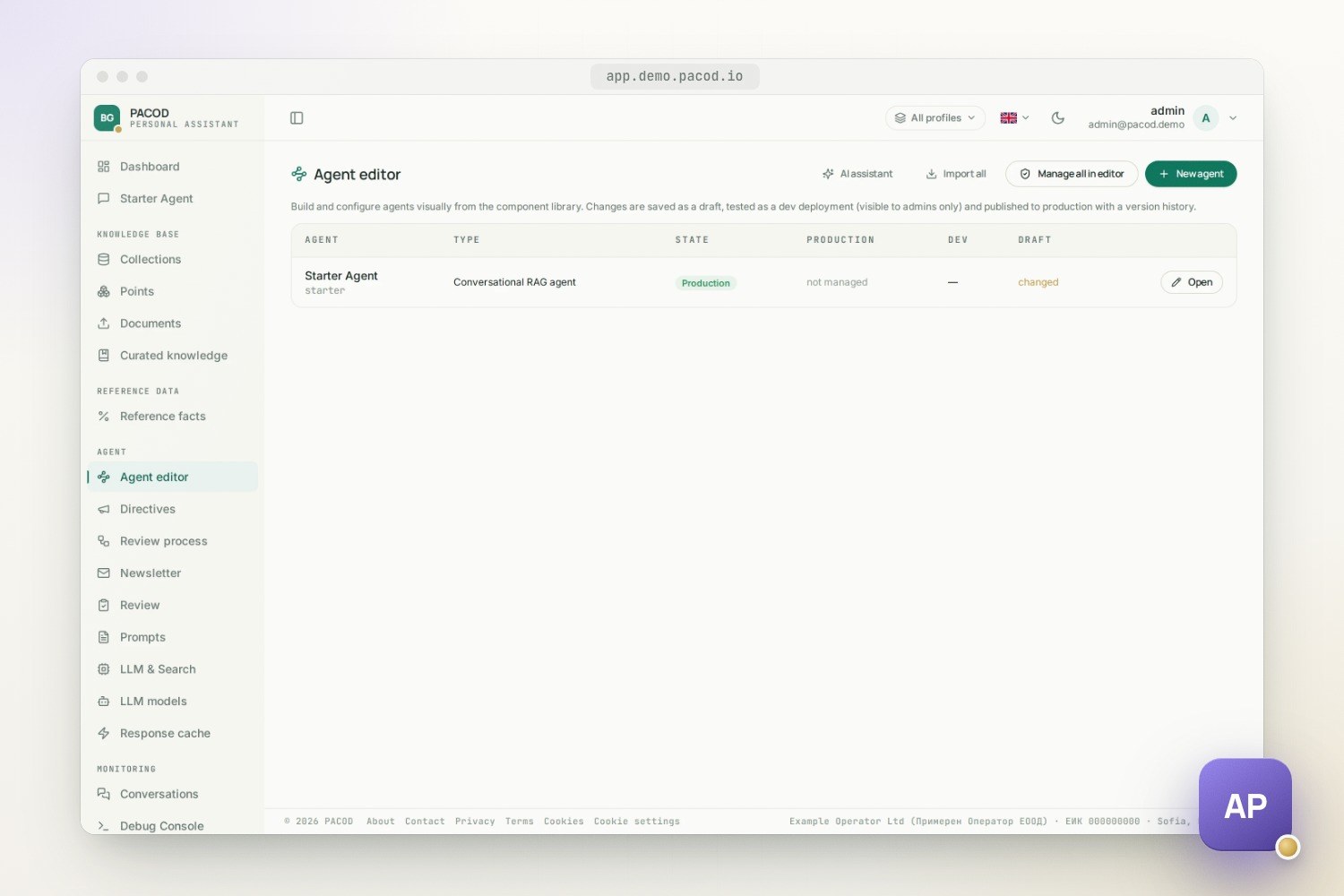
The agent editor
Superusers build and change agents in a visual editor. An agent is a graph of components from a
library, laid out on a canvas: the chat input, the language, quota and topic guards, the semantic
answer cache, the conversation memory, the planner, the three tools, the synthesizer, the verifier,
the follow-up suggestions and the chat stream. Every graph follows one template so far, the
conversational RAG agent (rag_chat_v1), with one place for each component, so components are
switched on or off and configured rather than wired freely.
- Inherit or override. Every setting of a component either inherits the agent's current value or overrides it. The form is generated from the component's schema.
- Draft, dev, production. A change is saved as a draft, deployed as a dev version that only admins can chat with (in the editor's test panel, or with a PROD/DEV switch in the chat), and published when it is ready. Versions are insert-only, so publishing and rolling back only move a pointer, and both clear the agent's answer caches.
- An AI assistant drafts a component's texts, such as its prompts, from the author's instruction. It never touches models, numbers or switches, what it proposes is validated like a draft, and nothing changes until the author applies it.
- A public page. The editor also holds the agent's copy for the public website: its card on the
home page and its own page at
/agents/<slug>.
A setting that a published version manages is locked on the older configuration pages, which show its value and refuse to change it, so the two places never disagree.
The improvement loop
Each agent improves from its own traffic. A worker reviews an agent's recent conversations when an
admin presses Run now, every day once the schedule is switched on (it is off by default), or for
a single turn picked on the Conversations page. The transcripts are redacted first: e-mail
addresses, IBANs, card and phone numbers, and, with the bg pack, Bulgarian personal and company
numbers. A run then has five stages:
- Triage. Turns the person rated are always analysed; empty, off-topic, clarifying and cached turns are always dropped. A cheap model judges the rest, by default; they can also all be analysed, or all dropped.
- Evidence. The reviewer reads what the assistant actually read: the verbatim context of the answer with its facts and passages, the directives in force, the conversation so far, the tool calls, and the passages that retrieval found and discarded.
- Analysis. Two independent analysts and a judge, or one analyst and a critic. A panel that is not really independent says so before and after the run, and never counts as full agreement.
- Routing and remedy. Each finding goes where it can be fixed, with the fix written out: the answer that should have been given and the facts a test can check.
- Clustering. Similar findings are grouped into recurring problems. A recurring problem is the ticket a reviewer works on: open, ticketed, resolved or dismissed.
| Failure | Where it goes |
|---|---|
| Content gap | A knowledge-base candidate in the Review queue, for a human to edit and approve |
| Retrieval miss | The turn's retrieval trace, for tuning |
| Hallucination, tone, behaviour | A corrected answer and a proposed rule, which becomes an inactive directive on request |
| A clean answer | A golden test, with the facts the answer must contain |
Nothing reaches the curated collection until an admin approves it, unless an auto-insert flag, off by default, is switched on and every strict check passes: full agreement, complete evidence, a grounded, low-stakes claim and high confidence. A claim the sources contradict is never inserted. Reviewers mark each finding useful, dismissed, duplicate or fixed, and the dismissal rate is the loop's own measure of how well it works. Two closing passes check the remedies: a meta-evaluation, at most once a day after a full run, of whether the curated notes are being used, and an optional re-asking of the questions behind claimed fixes through the live agent (off by default, since each case is a full turn).
Security and isolation
- Identity is delegated. Accounts, passwords, sessions and roles live in pacod-id. The frontend signs people in as a confidential client and keeps their tokens in Redis; the browser holds only an opaque session id. The API follows pacod-id's feed, so an ended session or a disabled account is refused within seconds, and the admin pages refuse to act on a copy of the roles older than 60 seconds. Account and role changes are made at pacod-id as the calling admin: only a superuser makes a superuser, and the last admin cannot be removed.
- Agents are fenced in code. The agent is authorized before any work, tool arguments that touch
agent data are set by code,
/v1/modelslists only the caller's agents, and every per-agent cache key carries the agent's id. - Internal doors are locked. The MCP tools and the endpoint that takes in the frontend's telemetry
need a shared token and refuse every call while it is blank. Development tokens need two separate switches. The
gateway's management API and pacod-id's internal listener are reachable only on
pacod-admin-net. - Secrets stay put. LLM provider keys live only in the gateway. Web-search keys are encrypted in the database. Secret files are generated, 0600 and gitignored, and the scripts that write them print names, never values. The edge's access log leaves out sign-in codes, tokens and keys.
- Prompt safety. A refusal of illegal requests tops the planner and synthesizer prompts and outranks admin directives, and a fixed phrase filter runs before the classifier. Admin and user text is always inserted as a value, never as a template.
Running and operating it
Three Docker Compose stacks start in order, and make up-all does it:
- The app, in two compose files. The app file holds pacod-ap's own services, Redis, PgBouncer and the embeddings service. The standalone file holds its copies of the shared components: Caddy, PostgreSQL, Qdrant and pacod-id, and mailpit locally.
- The gateway: pacod-gw's app file, from a checkout next to this one. It signs in through the same pacod-id, keeps its database in the same PostgreSQL and is served by the same Caddy.
- Monitoring: Prometheus, Alertmanager and Grafana. It is optional, and
make up-allstarts it whenmonitoring/.envexists.
On a laptop, the app is at http://localhost:8080, pacod-id at http://127.0.0.1:8070, the
gateway console at http://127.0.0.1:13000 and every mail at http://127.0.0.1:8025. The gateway answers with
its mock providers: scripted replies, no cost. Docker needs about 8 GB of memory and 20 GB of disk;
LOCAL_EMBEDDINGS_BACKEND=hash skips the 2 GB embedding model, at the price of meaningless
retrieval.
Because the shared components sit in their own file, pacod-demo loads pacod-ap's app file next to the other pacod projects and runs one copy of each shared component; the result runs at demo.pacod.io, with pacod-ap at app.demo.pacod.io. A demo without a provider key answers with the gateway's mock, and without its optional ingestion component the starter agent answers from its reference facts alone. Only one copy of each shared component can run on a host, so a standalone pacod-ap does not run beside another pacod stack.
- Configuration reads a Redis cache, then an
app_settingsrow keyed by agent, then the environment default. An outage falls back to the defaults instead of blocking a turn. - LLM calls are attributed to the person, session, turn, agent and purpose, so the console's usage, cost and analytics pages read the gateway's reports instead of keeping a ledger. The gateway's trace of a turn is the turn. A timed-out call is never retried, because the provider bills it anyway: the person asks again.
- Observability. An audit row per request, an opt-in per-step Debug Console, structured logs in the shared pacod format, and Prometheus metrics on every service, with Grafana dashboards for the app, the infrastructure, web traffic, crawlers and usage, plus the gateway's own.
- Backup.
make backupwrites one archive with the PostgreSQL dumps, the Qdrant snapshots, the uploaded documents, the configuration and the secrets, which must travel with the dumps;make restorereverses it. The gateway's own stores are backed up with pacod-gw's tools.
What has been tested, and the limits
- Unit tests run without a database, Redis or gateway, and cover agent isolation, the gateway client against recorded answers, the identity guard and the role catalogue. Integration tests run against a running stack: the MCP server with the starter facts, isolation included, and the chat guards.
make smoke-allchecks health, runs one chat turn through the gateway's mock and checks that the gateway's trace of that turn costs the same as the turn's owndoneevent, then runs the gateway's own smoke test.- The move from a LiteLLM proxy to pacod-gw was checked against the gateway's mock: reasoning deltas, native web-search citations, cached tokens, truncated answers, the thinking and prompt-cache parameters and the timeout's shape. Two checks are still open, and both need provider keys: comparing recorded fixtures of the old proxy, and one live complex turn.
- Real providers. The switch to real providers is prepared, but it has not yet been run with real keys.
- Off by default: the daily review schedule, auto-insert into the curated tier, the re-asking of fixed questions and the verifier pass. Retrieval fine-tuning from feedback is run by hand; nothing schedules it.
- Limits. Agents speak two languages, and a third is a code change, not configuration. The editor has one template. A timed-out turn is lost and has to be asked again.
Build your own agent
There are two paths:
- In the console. A superuser creates an agent on the Profiles page or in the agent editor. A
new agent starts in
devwith the generic prompts; you try it there and publish it when it is ready. - As code. A
ProfileSpecinpacod-api/scripts/profiles/<id>.py, with the data inpacod-api/data/profiles/<id>/: reference facts, a corpus and a golden set of questions.
from scripts.seed_profile import ProfileSpec

SPEC = ProfileSpec(
    profile_id="helpdesk",
    slug="helpdesk",
    name="Acme Help Desk",
    description="Answers questions about Acme's products and plans.",
    topic_name="acme_helpdesk",
    topic_description_en="Questions about Acme's products: plans, prices, limits, accounts, support.",
    topic_description_bg="Въпроси за продуктите на Acme: планове, цени, лимити, акаунти, поддръжка.",
    legal_year=2026,  # the reference year the facts and the corpus are filed under
    languages="en,bg",
    settings_overrides={"websearch.enabled": "false"},
    assign_to_all_users=True,
)
make seed-example PROFILE=<id> installs it: the agent, its collections, its prompt and setting
overrides (never over what an admin has tuned since), its facts and its corpus. The topic
description matters: the topic guard checks every question against it, and the review loop uses it
as the agent's scope. Then chat with the agent, look at the Debug Console and the gateway's trace of
a turn, and run make eval against the golden set. The review loop takes it from there.
Read more
- Runbook: stacks, secrets, real providers, backup, troubleshooting.
- The LLM gateway: attribution, retries, quotas, usage.
- Build your own agent: the full walkthrough.
- API architecture and UI architecture: the design in depth.
Quick start
Quick start on a laptop
make secrets-init
make up-all
make bootstrap-local
make smoke-all
open http://localhost:8080
Works with
- pacod-gw: Every LLM call goes through the gateway, attributed to the person, turn, agent and purpose; models, prices, provider keys, token limits, usage and cost are the gateway's.
- pacod-id: Accounts, passwords, sessions and roles live in pacod-id; people sign in through it, and the app and the gateway console share one account.
- pacod-kb: pacod-ap brings pacod-embeddings, the shared bge-m3 embedding and reranking service; run next to it, pacod-kb can embed and rerank through it instead of loading the model itself.